












Summary: in this tutorial, you will learn about JavaScript code editors and how to install the Visual Studio Code for coding JavaScript.
To edit JavaScript source code, you need a plain text editor such as Notepad on Windows. However, to simplify and speed up typing of JavaScript code, you need a JavaScript code editor.
Besides basic editing features, a JavaScript code editor provides you with syntax highlighting, indentation, autocomplete, and brace matching functionality. Some editors also allow you to debug JavaScript.
The following are some popular JavaScript code editors:
Note that all these JavaScript editors are free. As a matter of choice, we will use the Visual Studio Code.
Visual Studio Code is a free and open-source code editor developed by Microsoft. Visual Studio Code is often called VS Code.
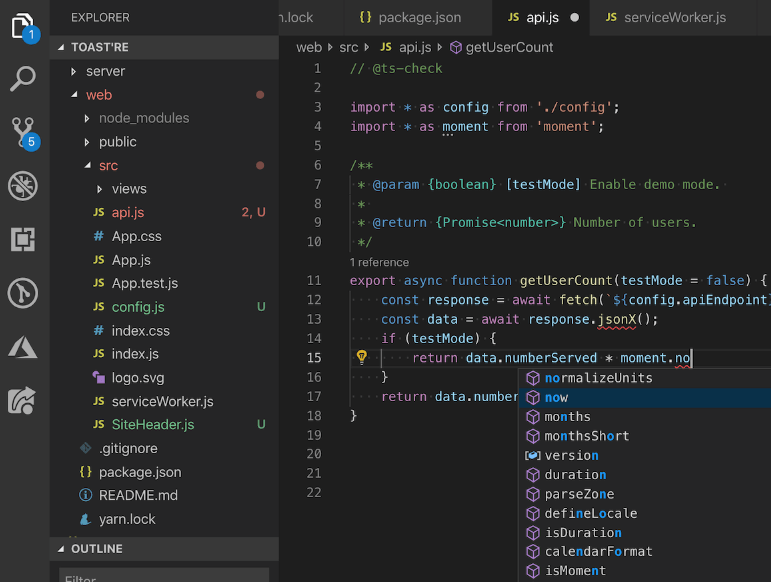
VS Code works across platforms including Windows, Linux, and macOS.
VS Code is highly customizable. It allows you to change the theme, keyboard shortcuts, preferences. It has lots of useful extensions that add extra functionality to the editor.
VS Code includes built-in support for JavaScript, which includes IntelliSense, debugging, formatting, code navigation, refactoring, and many other advanced language features.
To learn all the features supported by VS code, you check it out the JavaScript in Visual Studio Code.
To download the Visual Studio Code, you go to the following download link:
Setting up the Visual Studio Code is easy and quick. It is a small download so that you can install it in a few minutes.
To install the VS Code on Windows, you follow these steps:
Note that the installer will add the Visual Studio Code to your %PATH%. It will allow you to type the command code . to launch the VS Code on that folder.
You follow these steps to install the VS Code on macOS:
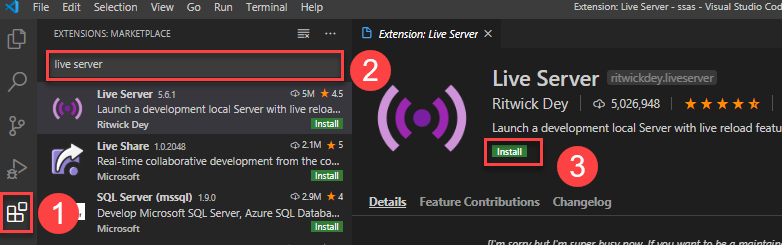
The live server extension allows you to launch a development local server with the hot reload feature for static pages. Once you change the JavaScript code, you don’t need to refresh the page to see the changes.
To install the Live Server extension, you follow these steps:
In this tutorial, you have learned about the JavaScript code editor and how to install the Visual Studio Code for editing JavaScript source code.
If you want to leave a comment, please log in first.





Comments